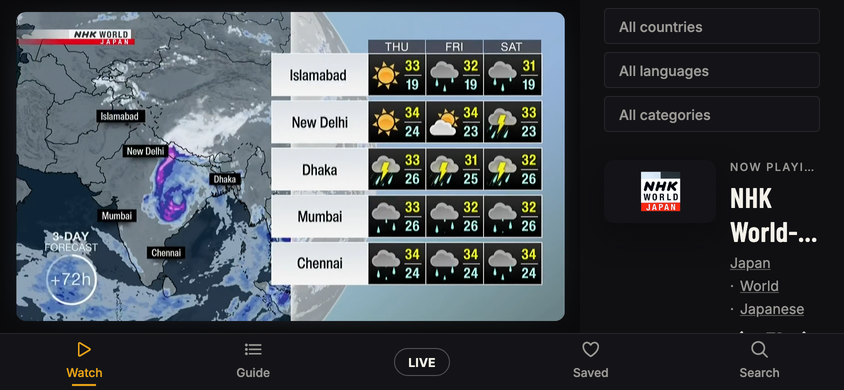
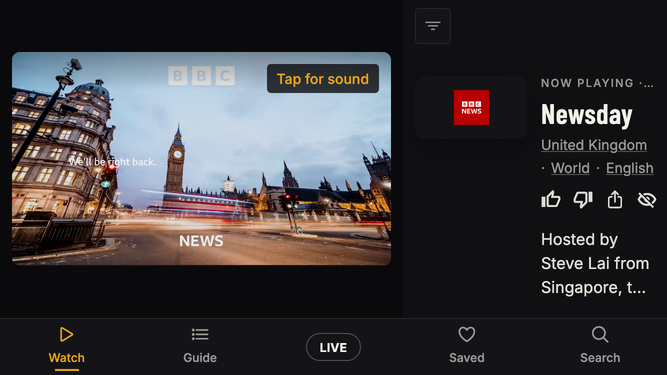
A phone held sideways, 844 × 390 (and 667 × 375 on the toggle). Watch was the model and generally right: picture left, panel right. Its column was too narrow, so it is fixed first, then every other screen is drawn on the same model. The one exception is the host's live room, which stays locked as it is. The new video page has its own mock, video-page.html.
Two regions. The picture, or the screen's main list, on the left; one panel on the right at 36% of the width, never under 272 or over 320 (304 at 844, 272 at 667). The picture fills its region less a 12 px gutter, capped by the height.
Tab bar as today. Across the bottom, 52 tall, Watch · Guide · LIVE · Saved · Search. It leaves only where something takes the bottom edge: the keyboard, Spotlight, and the host's full-bleed live room (locked).
The panel's top row does the portrait header's job. 48 tall: the screen's title or its filter on the left, the bell and the account on the right. Today a sideways phone has no header, so notifications and the account menu cannot be reached at all.
What sat above a list moves into the panel. Title, count, search and filters live in the panel; the list gets the full height on the left. Guide goes from one row to six.
A sheet opens in the panel's place. Notifications, Settings, filters, Perish reasons, programme detail: what is a bottom sheet in portrait replaces the panel, same width, and the picture keeps playing. A sheet's one action is pinned to the panel's foot.
Type in the panel. Labels 11 condensed; titles 24 condensed (22 at 667), two lines, breaking only between words; body 13; meta 12.5. A door (country, category, language) never breaks inside itself; the line wraps between doors.
Frame size iPhone 15 and iPhone SE held sideways, as the web build lays out.
Watch
The model, and the fix it needed first.
Watch · todayToday, on staging (a screenshot). The column is 264 wide and gives 112 of it to the logo tile, so the title breaks inside a word, Now playing truncates and the three doors stack one per line. At 844 the filters stack as three chips and push the rest below the fold (at 667 they already fold to one button).
Watch · fixedFixed. The panel is 36% of the width, never under 272 or over 320 (304 here, 272 at 667). The logo tile leaves: the picture already shows the channel. Order: Now playing · time, the title (condensed 24, two lines, breaks only between words), the doors on one wrapping line, the actions, Up next, then the shelves one card wide with the next one peeking.
NHK World-Japan
Japan Railway Journal 23:30–00:00 · Japan · World
LIVE
Watch · overlayOverlay up: the compact overlay, as today. The picture is 516 × 290 at 844 (was 556 × 313): 40 px of picture bought a column that reads.
Watch · long titleA long title takes its second line at a word break. With a filter on, the button in the top row names it in amber; the three chips never come back as a stack.
Watch · filtersThe filter button opens the filters in the panel (the portrait disclosure, sideways). The picture keeps playing. Done returns the panel.
Guide
23:0000:00Now
BBC NEWS
BBC News
Newsday
Business Today
BBC News
NHK WORLD
NHK World-Japan
NHK Newsline
Japan Railway Journal
Direct Talk
FRANCE 24
France 24
Le Journal
Business
The Debate
DW
DW English
DW News
Focus on Europe
DW News Asia
AL JAZEERA
Al Jazeera
Newshour
Inside Story
News
CNA
CNA
Asia Tonight
Singapore Tonight
The grid takes the left, six rows under the time axis. Title, clock, search and filters move to the panel. A tap on a programme shows it in the panel with Watch; the selected block carries the amber ring, the one you are watching the amber fill.
Saved
NHK WORLD
NHK World-Japan
Japan · News
Japan Railway Journal · 23:30–00:00
FRANCE 24
France 24
France · News
The Debate · 23:30–00:30
ARIRANG
Arirang
South Korea · General
Showbiz Korea · 23:00–23:30
KEXP
KEXP Live
United States · Music
RAI
Rai Italia
Italy · General
No longer broadcasting
The rows take the left at full height (five and a bit). The title, count, search and the hidden-channels note sit in the panel.
Categories
Not in the phone tab bar; reached from the filter row, as in portrait.
News
1,661 live
Sports
924 live
Movies
1,117 live
Music
802 live
Kids
311 live
Documentary
268 live
Entertainment
1,390 live
Business
143 live
Religious
410 live
Three across on the left. The panel holds the title, search and the two filters. No tab is active.
Atlas
Not in the phone tab bar either; reached from a country door or Search.
Europe48 · 6,287
Albania16
Andorra3
Austria42
Belarus25
Belgium31
Bosnia and Herzegovina19
Countries by continent on the left. Sort, language and search in the panel.
Spotlight
nhk×
Channels · 4
NHK WORLD
NHK World-Japan
NHK PREMIUM
NHK World Premium
NHK G
NHK G
NHK E
NHK E
qwertyuiopasdfghjkl⌫123space⏎Search
Typing: Spotlight covers the tab bar, the field sits in the top row, and the best results ride one row between the field and the keyboard.
nhk×
Channels
NHK WORLD
NHK World-Japan
Japan · News
Japan Railway Journal · 23:30–00:00
NHK PREMIUM
NHK World Premium
Japan · General
Kōhaku Classics · 23:00–00:30
NHK G
NHK G
Japan · General
NHK E
NHK E
Japan · Education
Keyboard down: channels on the left, countries and programmes in the panel. Back leaves Spotlight.
Room, as a visitor sees it
bytestream.tv/jake. The picture used to be about 200 px wide in the phone sheet; sideways it gets the stage.
Backstreets, Liguria
Newest · Jake airs on the N00bstream, next up 22:43
The Watch model: the picture left, the creator in the panel (name, facts, save, share, bio), Play newest, then the videos two across.
JoinAskLIVE
Night market set
Live on the N00bstream · 3 in the room
Live now: the LIVE ring on the avatar, and the viewer's Join and Ask pills top right of the picture, as locked.
Studio
The two tabs sit in the panel's top row.
Looping
Backstreets, Liguria
N00bstream · 22:31–22:43 · Next 22:43 Kitchen radio, Sunday
Channel: your channel playing on the left, as a visitor sees it. The panel carries the headline, Upload and Go live, then your videos with their states.
Your videos5 · 30:51 total
Backstreets, Liguria
On air
12:04
Kitchen radio, Sunday
In review
5:36
Rooftop timelapse
Encoding
3:11
Board tapes vol. 2
Uploading 62%
—
Untitled 3
Sent back · music
4:20
Control room: the ledger takes the left at full height; the readouts (unlock meter, stream server and key) take the panel.
Upload
The locked flow, one question at a time. The question on the left, the status card in the panel from step 2 on.
Tap to choose a video
Photos, Files, or your camera
1 · Tap to choose. The whole left region is the target.
What's it called?
Rooftop timelapse
Next
From the file name. Change it if you like.
qwertyuiopasdfghjkl⌫123space⏎Next
2 · The keyboard takes the bottom 190 px and the tab bar with it. The field sits at the top so it stays in sight; the status card stays in the panel.
Anything else?
All optional.
Description
Say what it is
Tags
Up to 5
Who's it for
Everyone
SkipNext
3 · Three big buttons across, all optional. Skip and Next under them.
Three things
It's yours
You made it, and you have the rights to everything in it, music included.
It's safe
No one under 18 in anything NSFW. Ever. No harassment or hate. NSFW gets rated 18+.
It's still yours
You keep the rights. We get to play it. Delete it any time.
4 · The three cards become three rows, title left, words right, so none of them is squeezed into a narrow column. The one button sits in the panel under the status card.
In review
Rooftop timelapse
Jake · 3:11
5 · The video in the frame with the pill telling the truth; the link, Copy, Share and what happens next in the panel.
Review
Uploads and Reports. The decision buttons sit at the top of the panel, above the fold.
1×2×
The upload at 2× with the filmstrip under it. The panel leads with the title, then Promote, Perish and Rate 18+: all three fit above the fold at both sizes. The details follow below.
1×2×
Perish asks why, in the panel. Send it back is pinned to the panel's foot so it never scrolls away.
Maya · 23 watchingLIVE
Reports: the reported live on the stage, the actions first in the panel, the line under them.
Notifications, the account menu and Settings
Reached from the panel's top row.
The bell opens the notifications in the panel's place, live rows first. The picture keeps playing.
Jake
jake@example.com
Settings
Notification settings
Sign out
The avatar opens the account menu, anchored under it: Settings first, then Notification settings, then Sign out.
Settings opens in the panel's place, Your name first.
Video page
bytestream.tv/v/rooftop-timelapse-7k2. All states on video-page.html.
Rooftop timelapse
Jake · 3:11
The video plays on the Watch-shaped stage; the panel holds the title, Jake (his Room), the facts, save and share, then Watch the N00bstream.
Not out yet
Jake just posted this. It plays here once it has been checked, usually within a day.
Not out yet: the frame says so in words and gives a time shape. The panel stays, so the way onto the N00bstream is still one tap.
18+
Rated 18+
It's hidden while Show adult channels is off. If you're 18 or over, you can turn it on in Settings.
Open Settings
Rated 18+ with adult channels off: no picture, no title, a quiet Open Settings in the frame. The panel leads with Jake instead.
Live room, streaming (reference)
Locked 2026-09-22 in phone.html; shown here unchanged. Everyone else in the room sees it on the Room page above.
LIVE04:1231 watching
Joins on
The host's live room goes full bleed: no tab bar, no panel. Status top left, controls on a rail at the right, Joins bottom right.
 16
 3
 42
 25
 31
 19